Send product feedback
Share an idea or usability problem with enough context to evaluate it safely.
What you will finish
The product team receives one clear observation, its impact, and a safe example.
Before you begin
Feedback is best when it describes a real job and the difficulty, not only a requested button. Use synthetic examples in screenshots and descriptions.
Have these ready
- Beta feedback is enabled for the workspace
- A specific workflow, page, or result
- A description of who is affected and how often
Stop and ask for help if
- The issue is blocking or causing incorrect behavior now; open a Help Desk ticket instead.
- A screenshot contains real resident or client data.
Step-by-step instructions
- 1
Open Beta feedback
Select the persistent bug button from any signed-in page, or select Beta feedback in the menu. If live submission is unavailable, the button opens your private feedback history instead of removing the control.
What you should see: The report form or private feedback history appears.
- 2
Write the summary and job
In Short summary, name one issue. In What should we fix? (optional), state what you were trying to accomplish, where, and what made it hard.
What you should see: The product team understands the user goal.
- 3
Add useful debugging detail
Open Add debugging detail (optional) only when it helps. Use How urgent is this?, What should have happened?, What happened instead?, and Steps to reproduce accurately.
What you should see: Impact and reproduction details are clear without guessing.
- 4
Attach only synthetic examples
Recreate the situation with fake names and numbers or crop/redact completely. Never upload a client CSV.
What you should see: The example is useful without exposing client information.
- 5
Submit once
Review for clarity and submit. Use Help Desk separately if operational help is also needed.
What you should see: A confirmation records the feedback.
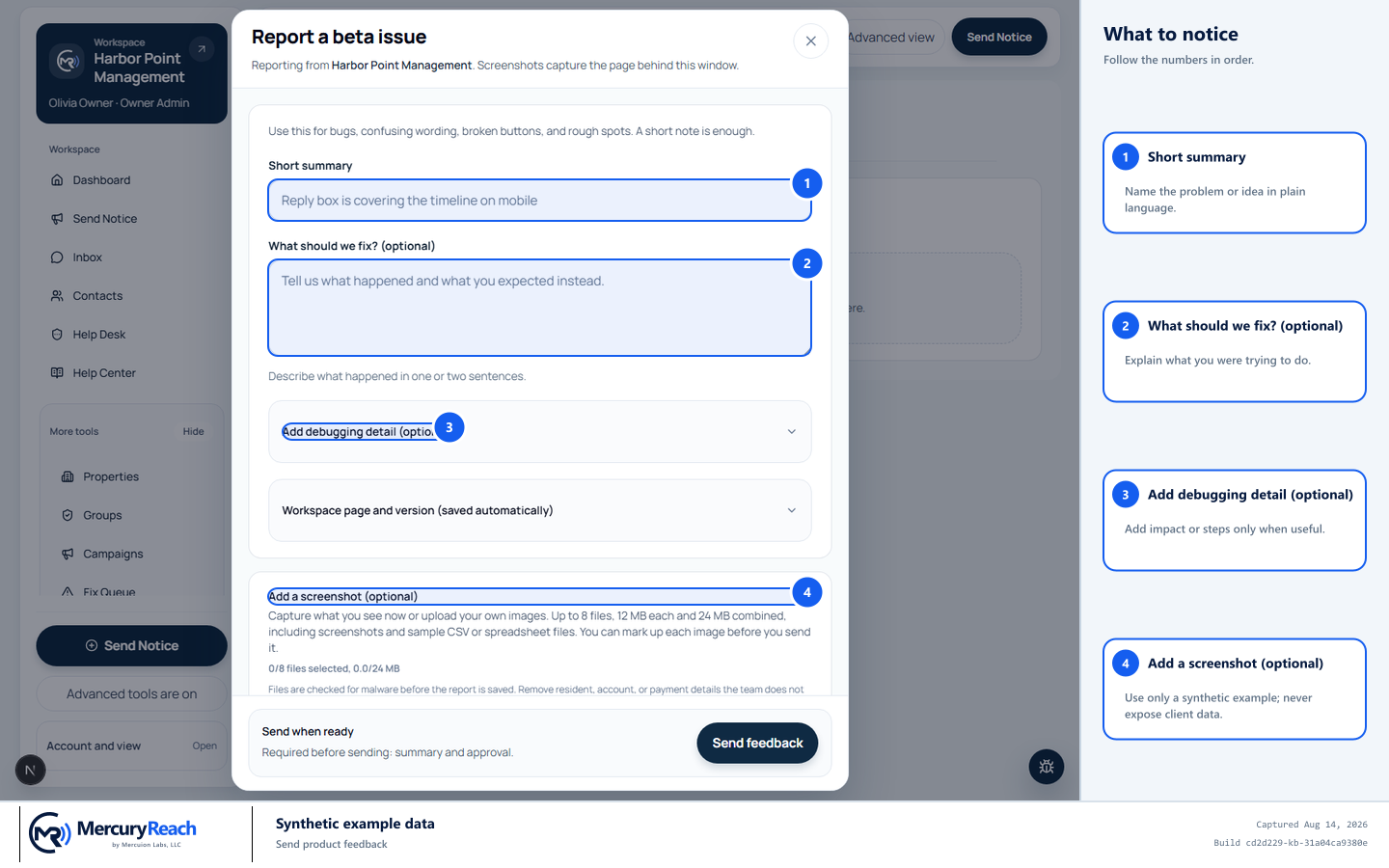
Explain the job and impact using only synthetic example data.
- 1
Short summary: Name the problem or idea in plain language.
- 2
What should we fix? (optional): Explain what you were trying to do.
- 3
Add debugging detail (optional): Add impact or steps only when useful.
- 4
Add a screenshot (optional): Use only a synthetic example; never expose client data.
MercuryReach training image · Synthetic example data · Captured 2026-08-20
Check your work
- The feedback names one user job and one problem or idea.
- Impact and frequency are described.
- Every example is synthetic and contains no client information.
If something does not look right
You are unsure whether this is feedback or support.
Use Help Desk when you need a response or current issue fixed; use Feedback for product learning. You may reference the support ticket number without copying private contents.