Record consent, channel preferences, and opt-outs
Keep text and voice eligibility accurate and honor a resident's communication choices promptly.
What you will finish
Each communication channel reflects verified consent and opt-out information with an appropriate record of the change.
Before you begin
A phone number is not the same as permission to send a text. Follow your organization's legal and consent policy; MercuryReach records do not replace that policy.
Have these ready
- An approved source for the resident's request or consent
- The correct contact record
- Your organization's consent and retention rules
Stop and ask for help if
- The requester cannot be matched reliably to the contact.
- Two records disagree about the same person's status.
- You are unsure whether the request changes texting consent, the preferred text-or-call channel, or both.
- A provider-side STOP block may still be active.
Step-by-step instructions
- 1
Find the exact contact
Search and verify the person's name, property, and the phone number or email involved.
What you should see: The request matches one contact and channel.
- 2
Open the contact
Open the exact contact and review Communication preference, Opt-in state, Last consent update, Opt-out events, and Preference updates.
What you should see: You can see the current choice and its history.
- 3
Apply the verified change
Open Edit contact details. Change Preferred channel when the resident's text-or-call preference changed. Change Contact is opted in only when the texting-consent evidence supports it.
What you should see: The form matches the verified request.
- 4
Update the contact
Select Update contact once. For an opt-out, do not send a test message afterward.
What you should see: The contact summary shows the new preference or opt-in state.
- 5
Handle restoration carefully
The safest restoration is for the resident to text START or UNSTOP. Use Enable locally with evidence only with current consent evidence and the required authorization; it does not clear a provider-side STOP block.
What you should see: Consent is not restored from a guess or an old record.
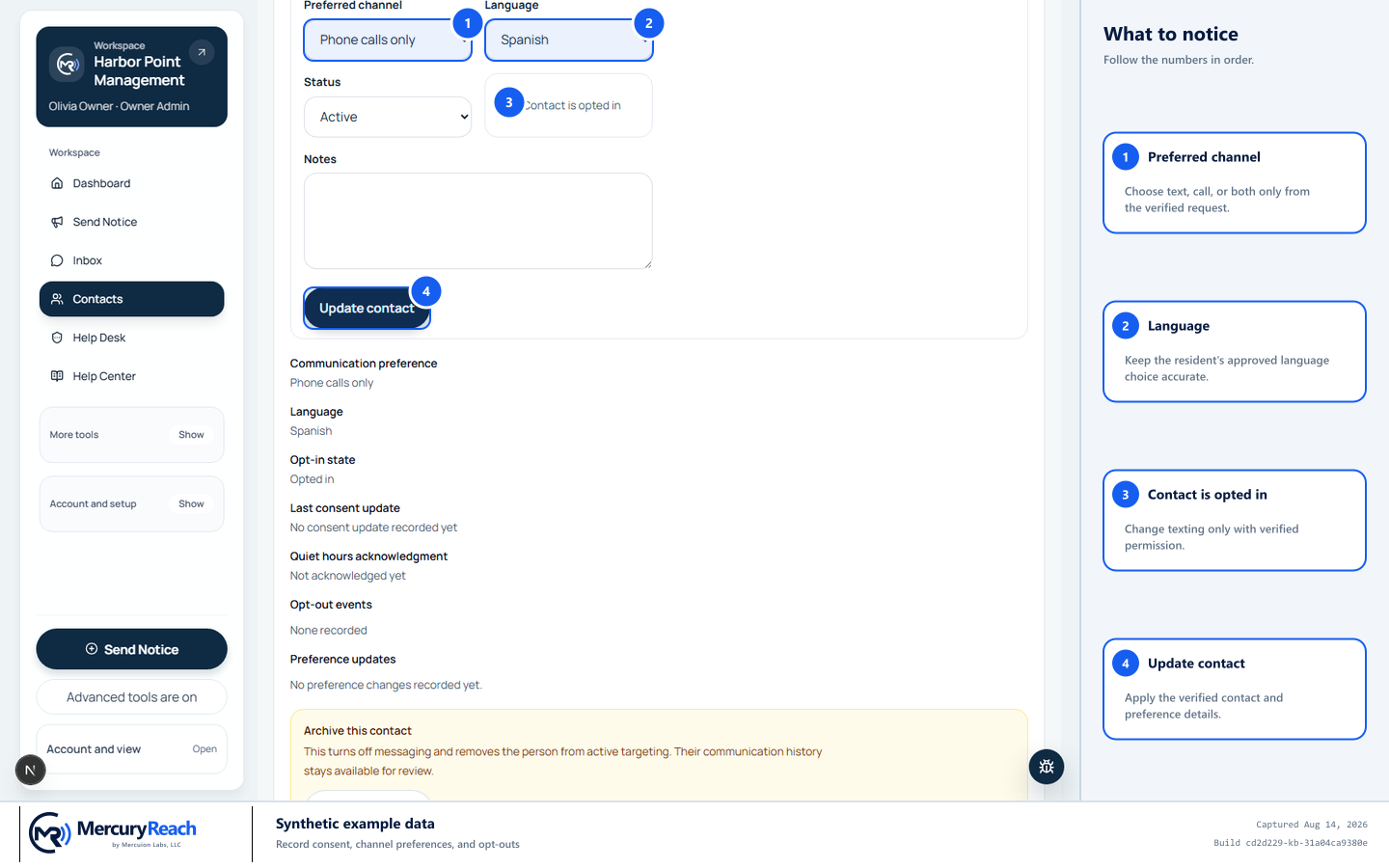
After verifying the person, record only the approved channel, language, and texting-consent changes.
- 1
Preferred channel: Choose text, call, or both only from the verified request.
- 2
Language: Keep the resident's approved language choice accurate.
- 3
Contact is opted in: Change texting only with verified permission.
- 4
Update contact: Apply the verified contact and preference details.
MercuryReach training image · Synthetic example data · Captured 2026-08-20
Check your work
- Preferred channel and Opt-in state match the verified request.
- A campaign preview excludes opted-out recipients from texting.
- Last consent update or Preference updates records the change without excess sensitive data.
If something does not look right
An opted-out person appears in a recipient preview.
Do not send. Remove the campaign from scheduling if needed and ask the Owner/Admin or Help Desk to investigate the record and preview.
The request is ambiguous.
Record nothing based on a guess. Follow your organization's process to clarify the channel and identity.