Resolve items in the Fix queue
Correct or reconcile contact and delivery problems one record at a time without changing consent or retrying blindly.
What you will finish
The underlying issue is corrected, reconciled, assigned, or escalated with no automatic or duplicate resend.
Before you begin
The Fix queue gathers records that need human attention, including invalid contact details, missed calls, and uncertain provider handoffs. Its queue controls do not retry a message. A fix must be based on a verified source, never a guess.
Have these ready
- Edit access
- A verified source for any corrected contact information
- An approved owner or escalation path
Stop and ask for help if
- You cannot verify the corrected value.
- The item involves opt-out, repeated provider rejection, widespread failures, or a person outside your property scope.
- A provider handoff has not been reconciled with the provider record.
Step-by-step instructions
- 1
Open the oldest relevant item
Open Fix queue and filter by property or issue if needed. Select one item.
What you should see: The affected contact, campaign, channel, and reason are visible.
- 2
Read the failure reason
Use the displayed reason to identify whether data, consent, provider, or another condition caused it.
What you should see: You know whether this is correctable by your role.
- 3
Verify before editing
Compare the record with an approved source. Update only the incorrect field; do not alter consent to bypass a failure.
What you should see: The contact record contains verified information.
- 4
Assign or escalate
Use Take ownership or Assign owner when available. Use Needs manager review for items outside your authority.
What you should see: The queue item has a responsible person or escalation state.
- 5
Resolve deliberately
Select Resolve item only after the correction or reconciliation is complete. Resolving does not send or retry a message. If the page offers a follow-up draft, open it only when approved and review its exact campaign audience before sending.
What you should see: The queue state is recorded without a duplicate message.
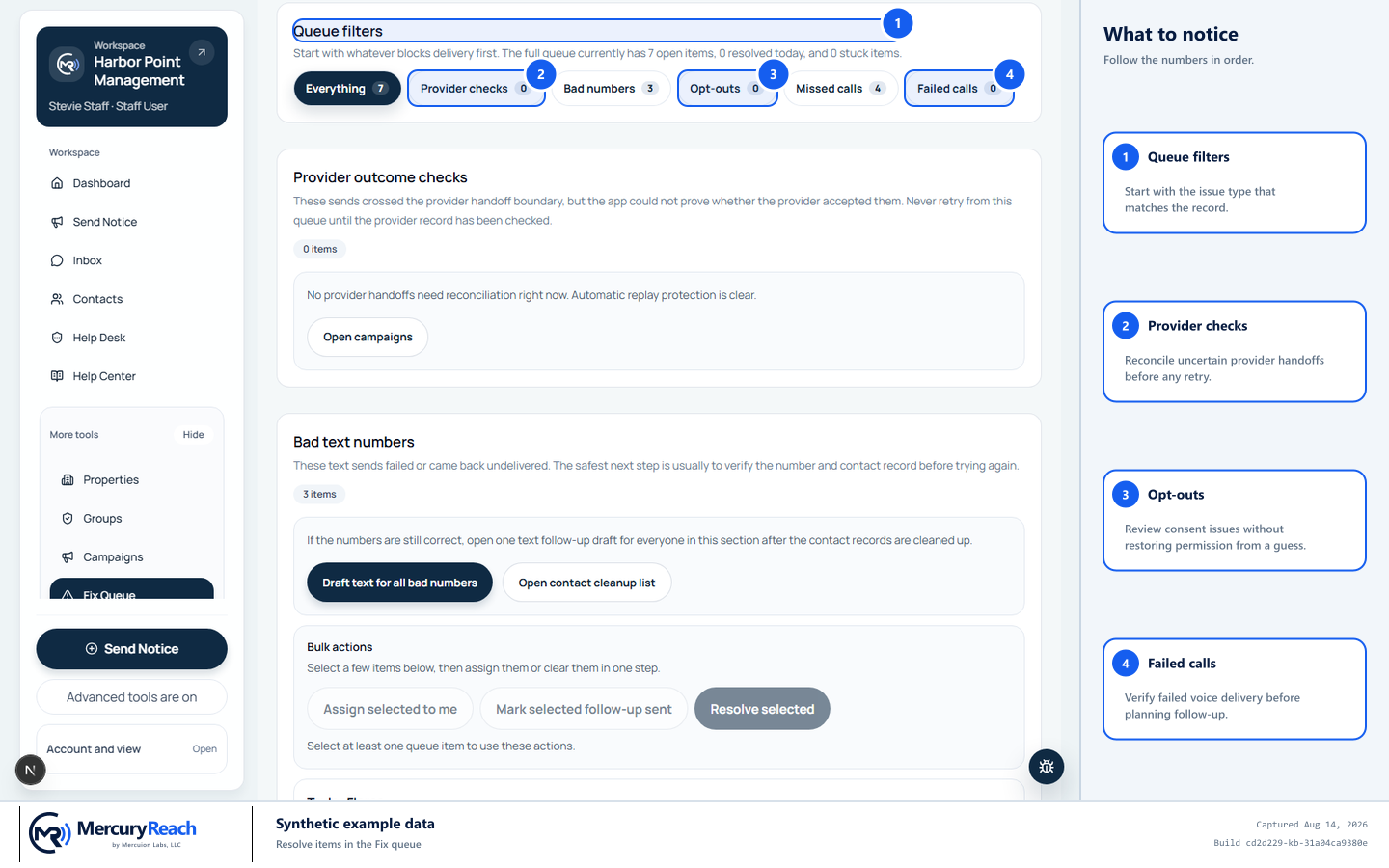
Choose the filter that matches the verified issue, then resolve one record at a time without assuming a resend occurred.
- 1
Queue filters: Start with the issue type that matches the record.
- 2
Provider checks: Reconcile uncertain provider handoffs before any retry.
- 3
Opt-outs: Review consent issues without restoring permission from a guess.
- 4
Failed calls: Verify failed voice delivery before planning follow-up.
MercuryReach training image · Synthetic example data · Captured 2026-08-20
Check your work
- The corrected field matches an approved source.
- Consent is unchanged unless a separate verified request required it.
- The queue item is resolved, assigned, or marked for manager review.
- No message was retried merely by changing queue state.
If something does not look right
The same failure returns after correction.
Do not create repeated follow-up campaigns. Escalate with the queue item, campaign, channel, times, and displayed reason.
The correct value is unknown.
Leave the record unchanged and follow your organization's process to verify it with the resident or source system.