Review campaign history and delivery results
Read campaign status, report totals, channel outcomes, and recipient-level results without guessing what happened.
What you will finish
You can explain the campaign outcome and route unresolved records to the right follow-up.
Before you begin
One campaign can contain different text and call outcomes at the same time. Read the overall status and each channel definition before reporting results.
Have these ready
- Access to campaign reports
- The campaign name, approximate send time, or owner
Stop and ask for help if
- Totals change unexpectedly while you review.
- Results show an unapproved audience or duplicate campaign.
- A provider warning or unusually large failure pattern appears.
Step-by-step instructions
- 1
Find the campaign
Open Campaigns and use the campaign log pages to find the exact name and time. Select that campaign.
What you should see: One campaign detail page with the expected audience and time is open.
- 2
Read overall status
Check Draft, Scheduled, Paused, Queued, Sending, Sent, Partial, Failed, or Cancelled before interpreting the report.
What you should see: You know whether processing is finished.
- 3
Read Campaign report
Review People targeted, Replies, Opt-outs, SMS confirmed delivered, and Human-answered calls. Do not combine unlike text and call outcomes into one delivered number.
What you should see: Each total is understood according to its label.
- 4
Inspect Recipients
Read each recipient's SMS, Voice, and Follow-up results and any provider details. Use the Fix queue or a displayed follow-up draft only after reviewing its exact audience.
What you should see: Each unresolved result has an owner or next action.
- 5
Report accurately
State the campaign, time, channel, status, totals, and remaining actions. Avoid copying resident data into unapproved reports.
What you should see: A reviewer can understand the outcome and limitations.
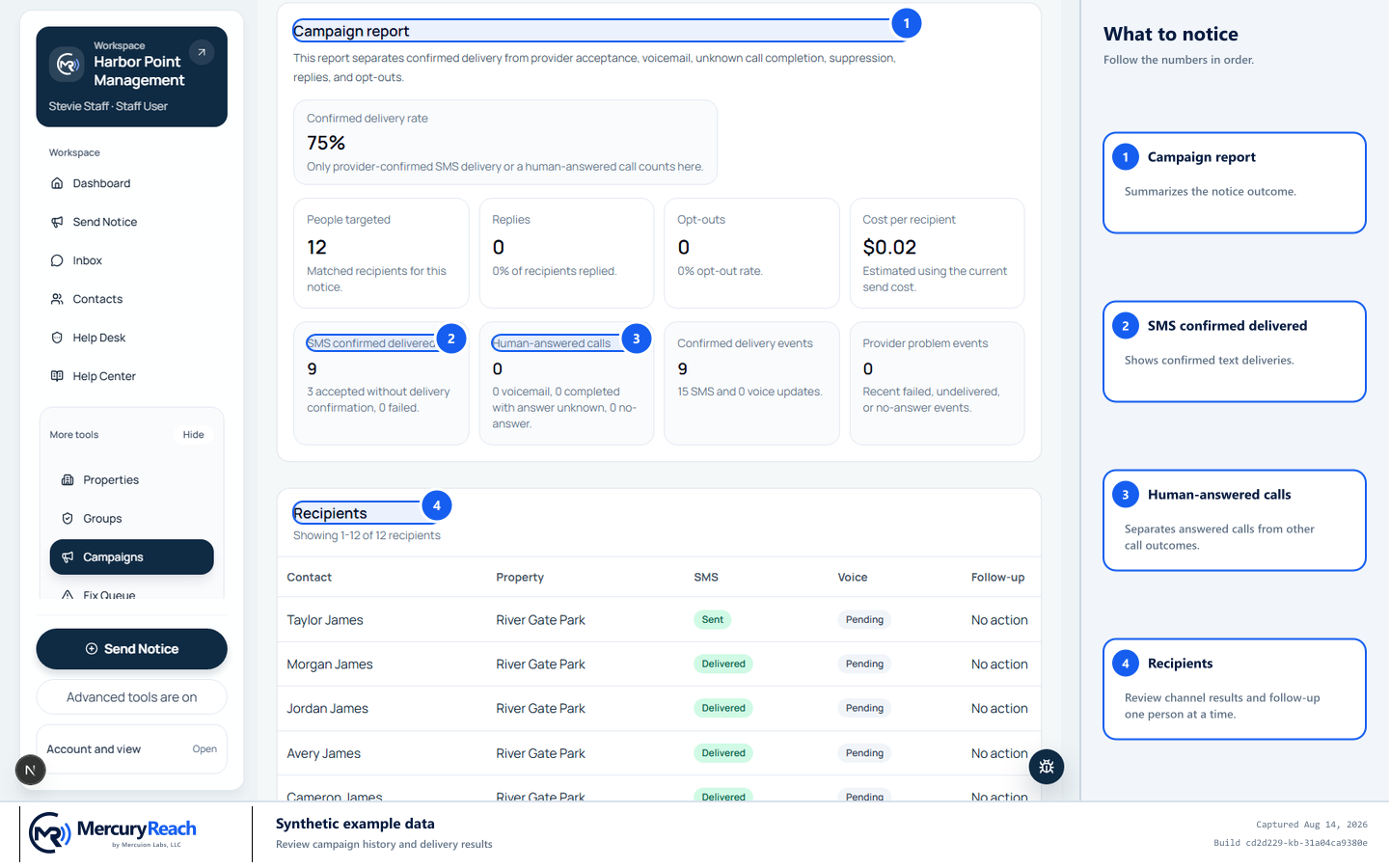
Interpret text and call results separately and inspect the recipient rows for follow-up.
- 1
Campaign report: Summarizes the notice outcome.
- 2
SMS confirmed delivered: Shows confirmed text deliveries.
- 3
Human-answered calls: Separates answered calls from other call outcomes.
- 4
Recipients: Review channel results and follow-up one person at a time.
MercuryReach training image · Synthetic example data · Captured 2026-08-20
Check your work
- Campaign identity and send time match the request.
- Overall status is included with any reported totals.
- Failures and exclusions have documented follow-up or an accepted reason.
If something does not look right
Delivered count is lower than sent.
Check whether processing is still pending. If complete, inspect failure reasons and Fix queue items rather than resending the whole campaign.
You cannot open recipient details.
Your role or property scope may limit them. Ask the campaign owner or Owner/Admin for an approved summary.