Troubleshoot a message that was not delivered
Use campaign status, consent, contact details, and failure reasons to diagnose one delivery safely.
What you will finish
You identify the recorded text or call outcome and take the narrowest safe correction, follow-up, or escalation action.
Before you begin
Do not resend the whole campaign because one person says they did not receive it. First identify the campaign, person, channel, and exact system result.
Have these ready
- Campaign name and approximate time
- The exact contact and channel
- Access to campaign results and the contact record
Stop and ask for help if
- The original audience or content was wrong.
- Many contacts fail with the same provider or system reason.
- The person opted out, disputes consent, or reports unwanted communication.
Step-by-step instructions
- 1
Confirm the campaign
Open Campaigns, find the exact campaign in the log, and verify its name, send time, audience, and overall status.
What you should see: You are investigating the correct campaign.
- 2
Find the recipient row
Open Recipients and find the person. Read SMS, Voice, Follow-up, and any provider detail shown for that row.
What you should see: The recorded channel outcome is visible.
- 3
Interpret the outcome
Distinguish Pending, Queued, Sent, Delivered, Completed, Failed, Undelivered, No answer, Voicemail, Opted out, and Not attempted according to the channel shown.
What you should see: You know which type of next step applies without treating every non-delivery alike.
- 4
Verify contact data
Compare the phone or email with an approved source. Never guess or change consent to force delivery.
What you should see: Any correction is verified.
- 5
Follow up or escalate
Use the Fix queue to correct or reconcile the issue. There is no recipient-level retry control. Use a displayed follow-up draft only when approved, then review its exact audience as a new campaign. Escalate repeated, widespread, provider, or unexplained issues.
What you should see: The action does not duplicate the whole audience.
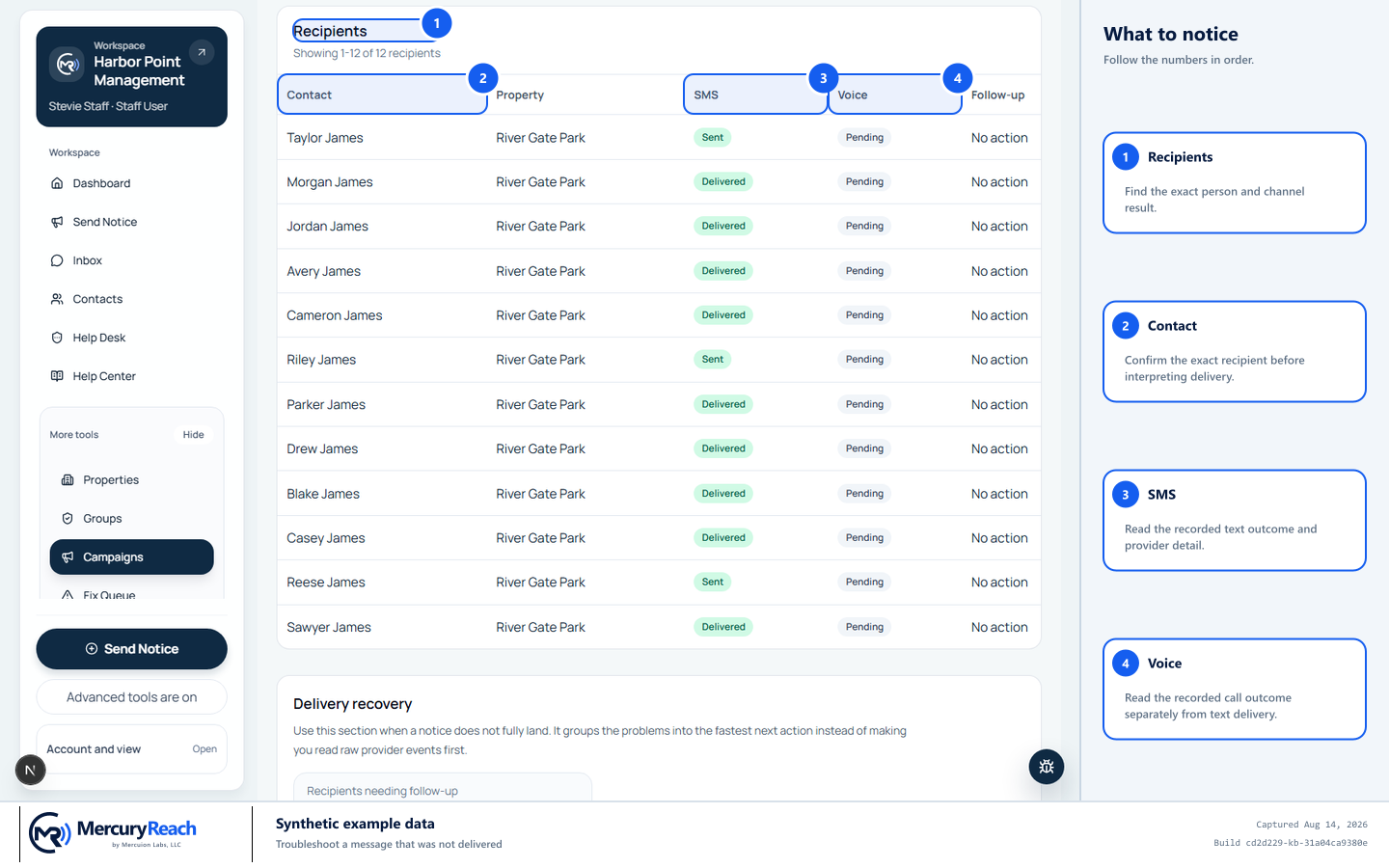
Diagnose the exact recipient and channel before taking a narrow next action.
- 1
Recipients: Find the exact person and channel result.
- 2
Contact: Confirm the exact recipient before interpreting delivery.
- 3
SMS: Read the recorded text outcome and provider detail.
- 4
Voice: Read the recorded call outcome separately from text delivery.
MercuryReach training image · Synthetic example data · Captured 2026-08-20
Check your work
- Campaign, contact, channel, result, reason, and time are documented.
- No broad resend was created.
- Any changed contact detail came from a verified source.
- Consent was honored.
If something does not look right
The result says delivered but the resident cannot find it.
Confirm the destination and time, ask them to check filtered mail or device handling under your approved support process, and do not promise device receipt beyond the reported provider status.
Many messages have the same failure.
Stop retries and open one Help Desk ticket with campaign link, channel, times, counts, and reason—without attaching resident exports.